Best starting point for long text, teaching material, nuanced writing, and structured thinking.
Guide / Tool comparison
Which AI tool do you use for what?
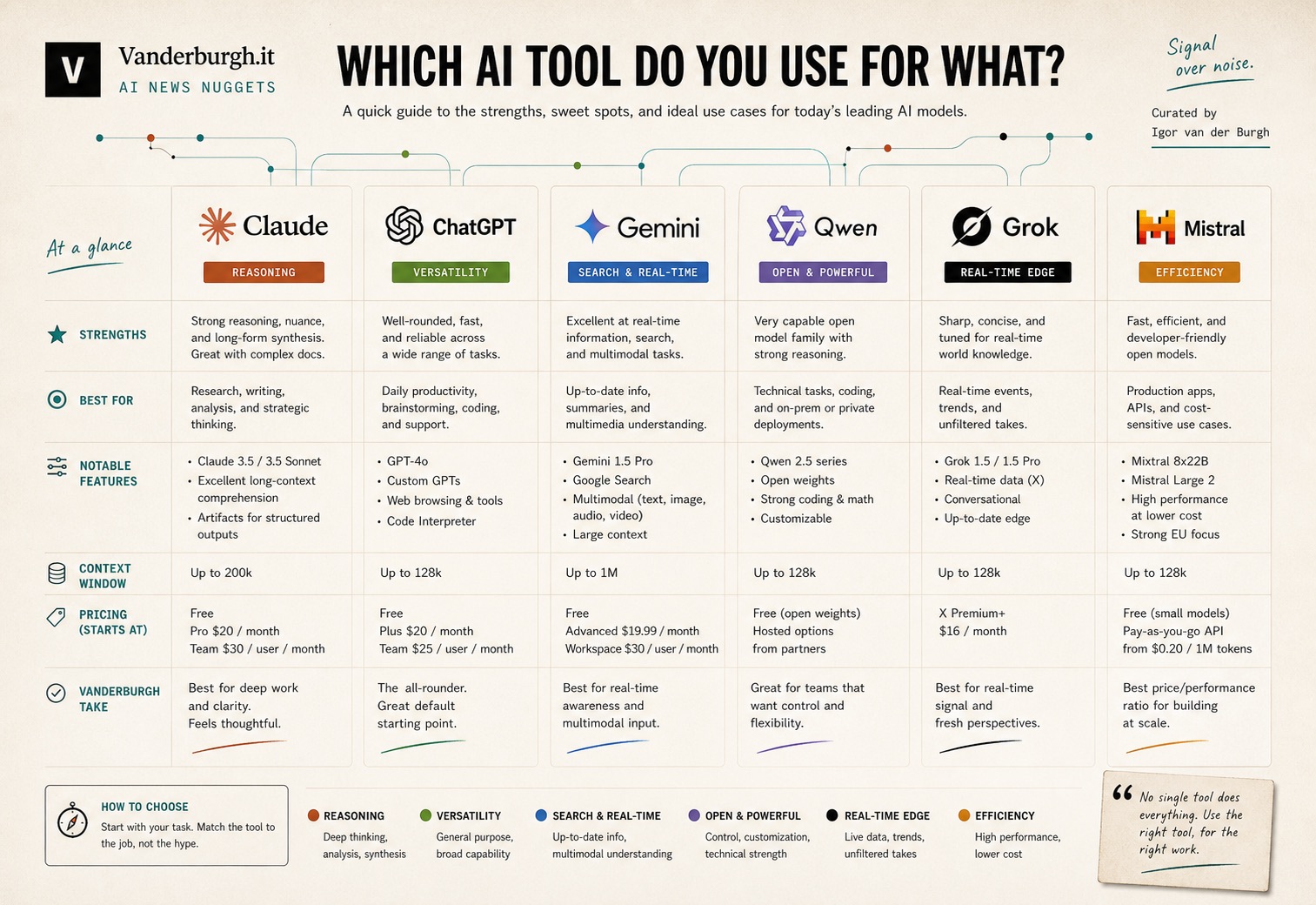
A practical field guide for choosing between Claude, ChatGPT, Gemini, Qwen, Grok, and Mistral by job-to-be-done.
Best for visuals, image edits, Custom GPTs, broad integrations, and general assistant work.
Best when your work already lives in Google Workspace or requires large-context processing.
Comparison matrix
Pick by the work, not by the hype
Treat this as a practical chooser. The right model is the one that fits the task, data sensitivity, ecosystem, and output format.
Writing
Claude
claude.ai
- Long texts, reports, and teaching materials.
- Code work, especially HTML, CSS, and WordPress-style tasks.
- Strategy, analysis, brainstorming, and human-sounding drafts.
Watch out: Not the first choice for image, video, or audio generation.
Pro tip: Build one reusable workflow for your most recurring task.
Visuals
ChatGPT
chatgpt.com
- Visuals for LinkedIn, marketing, and explainer content.
- Image editing, consistent faces, clothing changes, and precise edits.
- Custom GPTs, broad integrations, browsing, and form-assistance workflows.
Watch out: Writing can become formulaic if you do not steer the style.
Pro tip: Use it for visual work, then reuse the output in your writing workflow.
Workspace
Gemini
gemini.google.com
- Docs, Gmail, Drive, and Google Workspace-heavy work.
- Large documents, datasets, and long-context processing.
- Video and photo-realistic generation inside the Google ecosystem.
Watch out: Less compelling if your daily work is outside Google.
Pro tip: If you live in Google Workspace, choose the lowest-friction tool.
Local
Qwen
chat.qwen.ai
- Local experimentation and low-budget coding or agent tasks.
- Multimodal work across text, image, video, and audio experiments.
- Multilingual use cases where language coverage matters.
Watch out: Data-handling rules may be a blocker for some Western enterprises.
Pro tip: Use it as a low-cost playground when local control matters.
Real-time
Grok
grok.com
- Current events, live trend scanning, and X-native signals.
- Fast reactions to breaking topics and social discussions.
- Sharper, less filtered first-pass answers when that tone fits.
Watch out: Not always the safest first draft for brand-sensitive content.
Pro tip: Use it as a radar, not your primary writing desk.
Control
Mistral
chat.mistral.ai
- Open models, self-hosting paths, and direct answers.
- More control when you run models inside your own infrastructure.
- European AI positioning when architecture and hosting are chosen carefully.
Watch out: Cloud use is not the same as self-hosted data control.
Pro tip: For sensitive data, real control means local or tightly governed hosting.
Use a tool stack, not a single winner
Claude is the writing and reasoning desk. ChatGPT is the visual and ecosystem workbench. Gemini is the Google Workspace accelerator. Qwen and Mistral are worth watching when control and local experimentation matter. Grok is the radar for what is happening right now.